Cybersecurity · Authentication · OAuth · Least privilege
Locking the back door: how I secured my website's admin login
Whoever controls a website's admin panel controls what every visitor sees and runs. Here is how the admin for this site works without a server to break into, why its key only opens one door, and the supply-chain gap I still need to close.
The front door of a website is the part visitors see. The admin panel is the back door, and attackers know it. Whoever controls the admin controls what every visitor reads, and in the worst case, what code runs in their browsers. A defaced homepage is embarrassing. A homepage quietly serving a malicious script to everyone who visits is much worse.
So when I added an editor to this website, so I can publish posts from my phone without opening a code editor, I treated its login as the most sensitive part of the whole system.
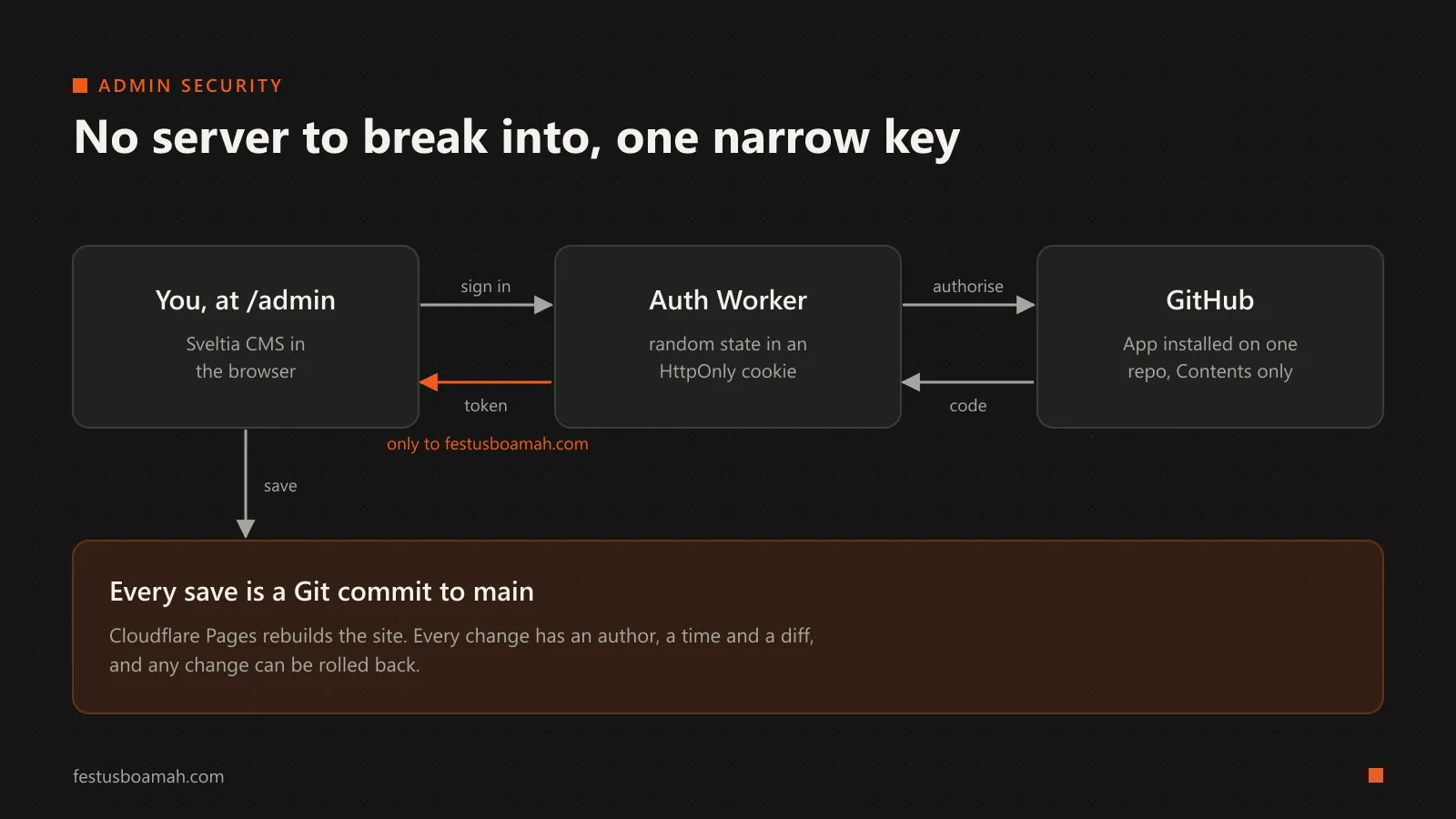
Decision 1: no server to break into
Most content management systems run on a server with a database of users and passwords. That server becomes a target: an outdated plugin, a weak password, or an exposed database can hand an attacker the whole site.
This site has none of that. It is a static site, rebuilt from a Git repository on GitHub every time something changes. The admin panel (Sveltia CMS) is just a JavaScript application that runs in my browser and talks directly to GitHub’s API. Saving a post means making a commit.
That shifts the security question. There is no admin server to patch and no password database to leak. The real question becomes: who can write to the repository? Everything else follows from the answer.
Decision 2: a key that opens one door
To write to the repository, the CMS needs a token from GitHub. The easy way to get one is a classic OAuth App with the repo scope. But that token would be able to read and write every repository my account can reach, public and private. If it leaked, the damage would go far beyond this website.
Instead, sign-in goes through a GitHub App that is:
- installed on this one repository only, and
- granted one permission: Contents (read and write). It cannot touch issues, settings, workflows, other repositories, or my account.
This is the principle of least privilege: give each key the smallest power that still does the job, so that when (not if) something goes wrong, the blast radius is small.
Decision 3: guard the hand-off
The OAuth sign-in flow passes through a tiny Cloudflare Worker (the open-source sveltia-cms-auth, vendored into my repository unmodified at a pinned commit so I know exactly what code runs). It holds the GitHub App’s client secret as an encrypted Worker secret, never in the code or the repository. Three of its checks are worth explaining, because each one blocks a real attack:
- Domain allow-list. The Worker only starts a sign-in for
festusboamah.com. Someone who copies my admin page to their own domain cannot use my login helper. - CSRF protection with
state. Before sending me to GitHub, the Worker generates a random value, stores it in anHttpOnly,Securecookie, and passes it to GitHub as the OAuthstateparameter. When GitHub sends me back, the two must match. This stops an attacker from tricking my browser into finishing a sign-in that they started. - Origin-checked delivery. The token is handed back to the CMS window with
postMessage. The Worker only releases it when the browser-reported origin of the requesting window is my domain. That origin is set by the browser, not by the page, so it cannot be faked.
Decision 4: make every change accountable
Because every save is a Git commit to main, every change to the site has an author, a timestamp and an exact diff. In STRIDE terms, this addresses repudiation: nothing changes on the site without a record. It also gives me instant recovery: if something bad were ever published, I can revert the commit and Cloudflare Pages rebuilds the clean version in about a minute.
The admin pages also get their own HTTP headers: a separate Content Security Policy, X-Robots-Tag: noindex so search engines don’t list them, and Cache-Control: no-store so nothing sensitive is cached.
Where it is still weak
- The CMS script has no integrity check. The admin page loads Sveltia CMS from the unpkg CDN. I pin an exact version, which protects against surprise upgrades, but there is no Subresource Integrity hash. If the CDN were ever compromised and served a modified file, my browser would run it with a valid GitHub token in reach. This is a classic software supply-chain risk. The fix is either an
integrityhash on the script tag or serving the file from my own domain. - The admin CSP is looser than the site’s. To load the CMS, the admin policy allows scripts from unpkg and inline scripts. That means if an injection bug ever existed in the admin, the policy would not stop a script from any package on unpkg. Self-hosting the CMS would let me tighten this too.
- Everything rests on one GitHub account. The App limits what a token can do, but whoever controls my GitHub account controls the site. That makes strong two-factor authentication on that account (ideally a passkey or security key rather than SMS) the most important control in this whole design, even though it is not in the code at all.
The lesson
The most useful security decision here was not a clever check. It was removing the server altogether, then making the one remaining key as narrow as possible. Before adding defences, it is always worth asking: what can I take away, so there is less to defend?
Spotted something I missed? Tell me.